If you’ve been on the fence about getting a dash cam, let me just say this: it’s 2026, and not having one is like not having insurance.
Except this kind of “insurance” might actually save you from a he-said-she-said nightmare after a fender bender, catch a hit-and-run while you’re in the grocery store, or just document that insane near-miss you can’t stop thinking about.
The good news? Dash cam technology has gotten ridiculously good. The bad news? There are hundreds of options, and it’s easy to get lost in a sea of spec sheets and marketing buzzwords.
We’ve dug through expert reviews, community forums, and hands-on testing results to narrow it down to the models that are actually worth your money right now.
In This Post
The Best Option? Your Car Might Already Have One
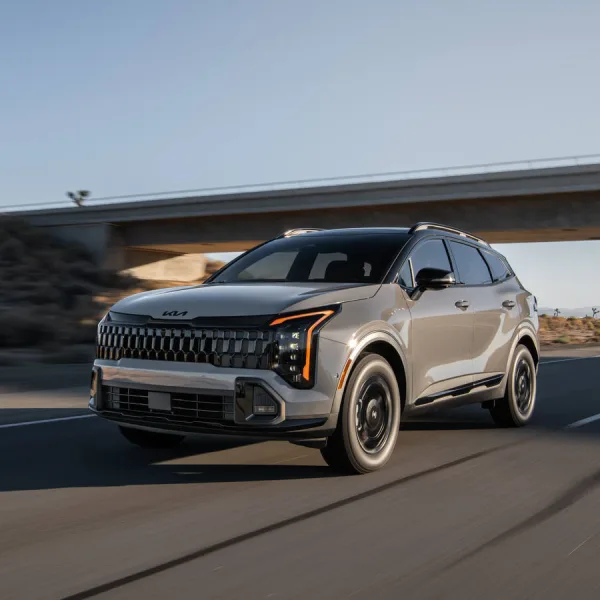
Before we even talk about aftermarket dash cams, I want to highlight what I honestly think is the best-case scenario: a vehicle that already has a factory-integrated camera recording system built in.
Think about it. Modern cars are rolling around with six, eight, even a dozen cameras already mounted on them for things like lane-keeping assist, parking sensors, surround-view monitoring, and autonomous driving features. The hardware is literally already there. When an automaker activates those cameras for dashcam-style recording, you get something that no aftermarket unit can fully replicate:
- Multiple angles with zero blind spots — Factory systems can record front, rear, and both sides simultaneously using cameras that are aerodynamically integrated into the body of the vehicle. No suction cups, no adhesive mounts, no wires snaking across your headliner.
- Seamless integration — The footage ties into the vehicle’s own infotainment system, GPS, speed data, and accelerometer data. Everything is already connected.
- No installation headaches — There’s nothing to mount, hardwire, or configure. It just works from day one.
- Parking surveillance that actually works — Because the car controls its own power management, factory systems can intelligently monitor while parked without the aftermarket concerns of battery drain, hardwire kits, or external battery packs.
Here’s a quick look at what’s available from major automakers right now:
| Manufacturer | System Name | Key Features |
|---|---|---|
| Tesla | TeslaCam / Sentry Mode | Records from up to 6 cameras (front, rear, side, B-pillar on HW4 vehicles). Sentry Mode monitors while parked and sends mobile alerts. Saves to USB/SSD. Dynamic recording duration based on storage capacity. Standard on all models. |
| Rivian | Gear Guard | Uses exterior cameras to record while parked, alerts via mobile app, live camera view remotely. Integrated into all R1S and R1T models. |
| BMW | Drive Recorder | 2-channel (front + rear) recording. Auto-saves 20 seconds before and after impact. Time-lapse mode available. Requires ConnectedDrive subscription and Parking Assistant Plus package. |
| Mercedes-Benz | MBUX Dashcam | Front-facing recording on select MBUX models with Augmented Reality navigation. Records to USB stick with time and speed data. Manually activated. |
| Toyota | Integrated Dashcam | Dealer-installed factory option compatible with a huge range of 2022–2026 models (RAV4, Camry, Highlander, Tacoma, Tundra, 4Runner, Prius, Sequoia, and more). G-force auto-save, parking surveillance, and manual action button. Records 1080p. |
| Subaru | EyeSight Recording | EyeSight’s dual cameras record a 22-second rolling loop that captures footage around an accident event. |
| Chevrolet/GMC | Surround Vision Recorder (select EVs) | Emerging feature on newer electric trucks. Records from surround-view cameras to SD card or USB. Details still rolling out via software updates. |
Tesla deserves a special mention here. Their system is the most mature and comprehensive factory offering on the market. Every Tesla records from multiple exterior cameras while driving, automatically saves footage around detected impacts or horn honks, and Sentry Mode provides full parking surveillance with mobile notifications — all at no additional subscription cost for the core dashcam features. The recent Dynamic Recording Duration update even lets newer models store up to 24 hours of rolling footage depending on your drive’s storage capacity. Rivian’s Gear Guard is a close second, offering a similar experience with live remote camera viewing.
The bottom line: If you’re shopping for a new vehicle and dashcam footage matters to you (and it should), strongly consider making built-in recording capability part of your purchase criteria. You’ll get better coverage, cleaner installation, and tighter integration than any aftermarket solution can deliver. It’s the gold standard.
What to Look For in an Aftermarket Dash Cam in 2026
Before I drop the recommendations, here are the things that actually matter when you’re shopping for a dash cam if your vehicle doesn’t already have one:
- Sony STARVIS 2 sensors — This is the gold standard for image quality right now. If a dash cam doesn’t have a STARVIS 2 sensor (at least on the front camera), it’s already behind. These sensors handle low light dramatically better than their predecessors and produce footage with far less noise.
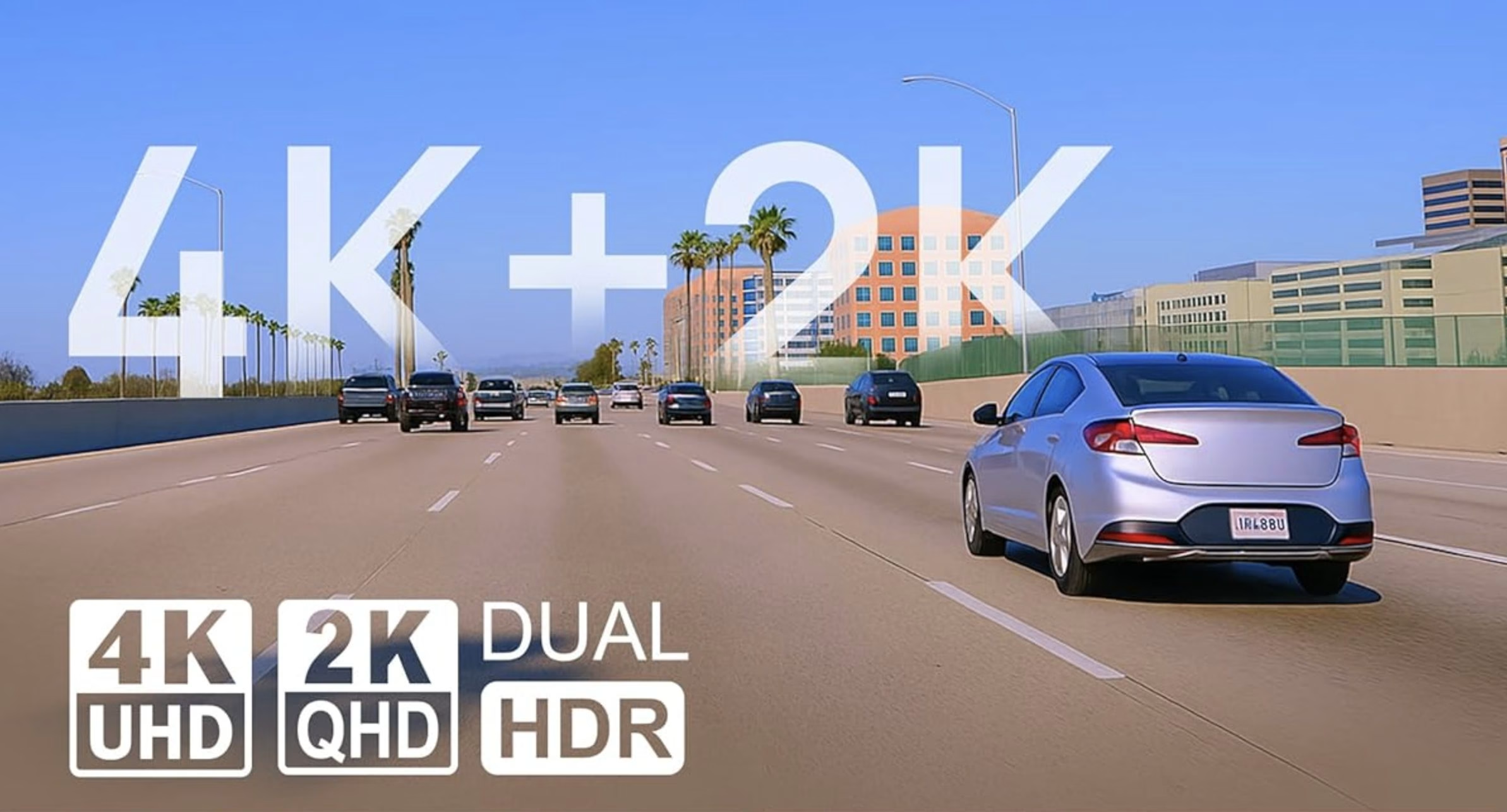
- 4K front resolution (minimum 2K) — 4K has become the baseline expectation for front-facing cameras at the mid-range and above. At 4K, you can reliably read license plates in daylight at highway speeds. 2K is fine for budget picks, but anything less feels like settling.
- HDR support — High Dynamic Range matters more than most people think. It’s what keeps headlights from blowing out your footage at night and keeps shadowy areas visible.
- Reliable parking mode — Not all parking modes are created equal. The best options use either radar detection or ultra-low-power impact sensing to protect your car while you’re away without killing your battery.
- Heat tolerance — Dash cams live on your windshield in direct sun. Supercapacitors are more heat-resistant than lithium batteries and are generally preferred for longevity. Check for a wide operating temperature range.
- Storage flexibility — Look for support of at least 256GB microSD cards. Some newer models now support external SSDs up to 4TB, which is a game-changer for road trippers and commercial drivers.
The Top Aftermarket Picks at a Glance
| Dash Cam | Best For | Front Resolution | Rear Resolution | Approx. Price | Sensor |
|---|---|---|---|---|---|
| Viofo A329S | Best overall | 4K @ 60fps | 2K | $360–$500 | Sony STARVIS 2 IMX678 |
| BlackVue Elite 9 | Cloud & remote monitoring | 4K @ 30fps | 2K HDR | ~$495–$520 | Sony STARVIS 2 IMX678 |
| Thinkware U3000 Pro | Best parking surveillance | 4K @ 30fps | 2K | ~$499–$580 | Sony STARVIS 2 IMX678 |
| Garmin Dash Cam X310 | Best compact/premium single-cam | 4K @ 30fps | N/A (front only) | ~$400 | Garmin proprietary |
| Viofo A119 Mini 2 | Best budget pick | 2K | N/A (front only) | ~$90–$110 | Sony STARVIS 2 IMX675 |
| Vantrue N4 Pro S | Best 3-channel value | 4K @ 30fps | 2K + 2K interior | ~$380 | Sony STARVIS 2 (all 3 channels) |
Detailed Breakdown
1. Viofo A329S — Best Overall Dash Cam
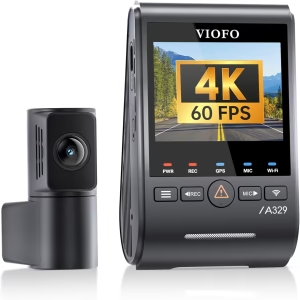
If I had to recommend just one dash cam to someone who wants the best bang for their buck, this is it. The A329S has been the consensus top pick across multiple independent reviewers, including Vortex Radar and Wirecutter, and for good reason.
The front camera shoots true 4K at 60 frames per second (dropping to 30fps with HDR enabled), and the rear camera captures 2K with its own STARVIS 2 sensor. That dual-sensor setup means you’re getting legitimately excellent footage from both angles, not just a strong front camera paired with a mediocre rear unit.
What makes it stand out:
- First dash cam to natively support external SSD storage up to 4TB — no more worrying about looping over important footage on a long trip
- Wi-Fi 6 support means downloading a one-minute 4K clip to your phone takes under 10 seconds
- Expandable from 1-channel all the way up to 3 channels (add a 210° fisheye cabin cam for rideshare or fleet use)
- Ultra-low-power parking mode that won’t drain your battery
- Over-the-air firmware updates through the Viofo app
- Included CPL (polarizing) filter to cut windshield glare
- Voice control for hands-free operation
What’s not perfect: The build quality feels a bit plasticky for the price, and the 3-channel configuration pushes close to $500. The 2.4-inch screen works fine but most people will end up using the companion app instead.
Pricing: ~$360 (1-channel), ~$400–$430 (2-channel), ~$500 (3-channel)
2. BlackVue Elite 9 — Best for Cloud & Remote Monitoring
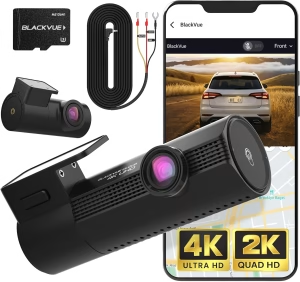
If staying connected to your vehicle from anywhere in the world is a priority, the BlackVue Elite 9 is the one to get. BlackVue has been the leader in cloud-connected dash cams for years, and the Elite 9 brings their image quality up to par with the competition while keeping that best-in-class cloud experience.
The front camera shoots 4K using the same Sony STARVIS 2 IMX678 sensor found in the Viofo, and the rear camera uses the IMX675 at 2K with HDR on both channels. BlackVue also captures at 12-bit internally and then processes down to an 8-bit output using HEVC (H.265) compression, which produces noticeably richer footage.
What makes it stand out:
- Industry-leading cloud platform with remote live view, push notifications on impact, GPS tracking, and two-way voice communication (requires optional LTE module)
- Power Saving Parking Mode draws under 0.5 mA — that’s hundreds of times less than standard recording mode, meaning weeks of standby on your car battery alone
- Wakes from sleep in under 1 second when impact is detected
- Sleek cylindrical design that practically disappears behind the rearview mirror
- Supercapacitor-based for heat resilience, operating from -4°F to 149°F
What’s not perfect: You’re paying a premium for the BlackVue ecosystem. The optional LTE module is extra, and the cloud features need a data plan. Some users have found the app interface a bit frustrating, particularly when managing multiple cameras. Storage fills up faster due to higher bitrates.
Pricing: ~$495–$520 for the 2-channel setup. LTE module and battery pack sold separately.
3. Thinkware U3000 Pro — Best Parking Surveillance
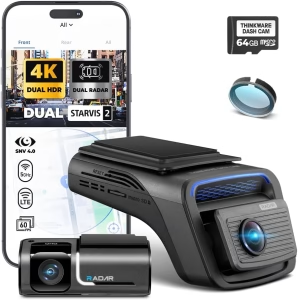
If your car sits in parking garages or on the street regularly and you worry about it getting dinged (or worse), the Thinkware U3000 Pro has the most sophisticated parking protection I’ve seen in a consumer dash cam.
The standout feature is built-in dual radar sensors — yes, on both the front and rear cameras. These radar sensors can detect motion up to 5 meters from your vehicle while the camera is in a low-power state. When something moves into that zone, the camera wakes up instantly and starts recording. No false alarms from distant pedestrians or shifting shadows that plague motion-detection-only systems.
What makes it stand out:
- Built-in dual radar on front and rear cameras for intelligent parking surveillance
- Sony STARVIS 2 sensors on both cameras with HDR support (front in 4K mode)
- Super Night Vision 4.0 for enhanced low-light footage
- Optional LTE module for remote monitoring and impact alerts
- ADAS features including forward collision warning, lane departure, and front vehicle departure alerts
- Expandable to a 3-channel setup with cabin camera
- Hardwire kit included in the box
What’s not perfect: No built-in screen — you’re entirely dependent on the companion app for setup and playback. The front camera’s 147° field of view feels narrow compared to competitors. Some reviewers noted that default image settings need tweaking through the app to get the best results. The full package with LTE and rear camera pushes well past $600.
Pricing: ~$430 (front only), ~$550 (front + rear), ~$499–$580 for Pro versions. LTE module ~$150 extra.
4. Garmin Dash Cam X310 — Best Premium Single-Camera
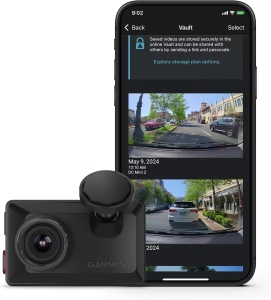
Not everyone needs a multi-channel setup. If you just want a rock-solid front-facing camera that’s compact, beautifully designed, and “just works,” the Garmin X310 is hard to beat.
At roughly the size of a matchbox, it tucks up behind your rearview mirror and practically vanishes. It shoots 4K at 30fps with HDR, has a built-in polarizing filter to cut windshield glare, and includes a 2.4-inch touchscreen for on-device playback and settings — no app required (though the Garmin Drive app is available for those who want it).
What makes it stand out:
- Incredibly compact at just 2.76 x 1.66 x 0.77 inches
- Built-in Garmin Clarity polarizer filter reduces glare
- 2.4-inch touchscreen for app-free operation
- Voice control in six languages
- Optional Vault cloud subscription for automatic clip uploads, live view, and parking guard notifications
- Can sync with up to four Garmin dash cams for multi-angle coverage
- Magnetic windshield mount for easy removal and transfer between vehicles
- Small internal battery provides ~20 minutes of cable-free recording
What’s not perfect: It’s a front-only camera, so you’ll need to buy additional units for rear coverage. The 140° field of view is narrower than some competitors. No microSD card included at the $400 price point feels stingy. Parking mode and cloud features require a paid Vault subscription ($9.99/month) plus hardwired power and a Wi-Fi connection.
Pricing: ~$400. Vault subscription $9.99/month. Constant power cable ~$50 extra.
5. Viofo A119 Mini 2 — Best Budget Dash Cam
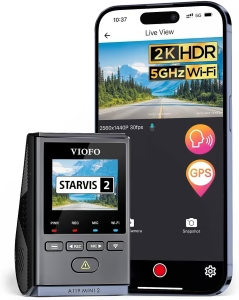
You don’t have to spend $400+ to get a genuinely good dash cam. The Viofo A119 Mini 2 is the go-to budget recommendation across basically every reputable review site right now, and it punches well above its weight.
It uses a Sony STARVIS 2 IMX675 sensor at 2K resolution with HDR, which is the same sensor many premium dash cams use for their rear cameras. That means you’re getting excellent low-light performance and dynamic range at a fraction of the price.
What makes it stand out:
- Genuine 2K resolution with Sony STARVIS 2 sensor and HDR — not the fake upscaled “2K” you find on cheap Amazon specials
- Buffered parking recording that captures footage before and after an impact, not just after
- Compact wedge shape that hides behind a rearview mirror
- Voice control for hands-free operation
- Solid companion app for reviewing footage and adjusting settings
What’s not perfect: It’s front-only, so no rear coverage. 2K is good, but not 4K — you may struggle to read distant license plates at highway speed. No Wi-Fi 6 or SSD support. You’re getting a great camera for the money, but it’s still a budget pick.
Pricing: ~$90–$110
6. Vantrue N4 Pro S — Best 3-Channel Value
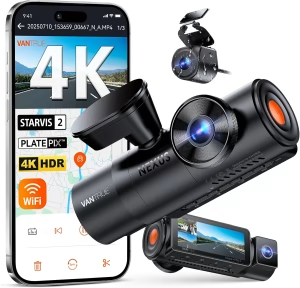
For rideshare drivers, parents of teen drivers, or anyone who wants complete coverage from front, cabin, and rear in a single device, the Vantrue N4 Pro S is the value leader. All three cameras use Sony STARVIS 2 sensors, which is unusual at this price point.
What makes it stand out:
- Triple STARVIS 2 sensors across front (4K), interior, and rear (2K each)
- Supports up to 1TB microSD storage
- Infrared interior camera for clear cabin footage at night
- Advanced parking modes
- Strong overall value for full-coverage recording
What’s not perfect: Three channels recording simultaneously generates a lot of heat and data. Some reviewers noted the unit runs warm. It’s bulkier than single or dual-channel alternatives.
Pricing: ~$380
Quick Comparison: Key Features
| Feature | Viofo A329S | BlackVue Elite 9 | Thinkware U3000 Pro | Garmin X310 | Viofo A119 Mini 2 | Vantrue N4 Pro S |
|---|---|---|---|---|---|---|
| Front Sensor | IMX678 | IMX678 | IMX678 | Garmin proprietary | IMX675 | STARVIS 2 |
| Max Front FPS | 60fps | 30fps | 30fps (4K) / 60fps (2K) | 30fps (4K) / 120fps (1080p) | 30fps | 30fps |
| HDR | Yes (both channels) | Yes (both channels) | Yes (front 4K + rear) | Yes | Yes | Yes |
| Built-in Display | 2.4″ | No | No | 2.4″ touchscreen | Small LCD | 2.45″ |
| Wi-Fi | Wi-Fi 6 | Wi-Fi + optional LTE | Wi-Fi + optional LTE | Wi-Fi + Bluetooth | Wi-Fi | Wi-Fi |
| GPS | Yes | Yes | Yes | Yes | Yes | Yes |
| Max Storage | 512GB SD + 4TB SSD | 512GB SD | 512GB SD | 512GB SD | 512GB SD | 1TB SD |
| Parking Mode | Ultra-low power | <0.5mA power saving | Dual radar detection | Vault subscription | Buffered impact | Motion + impact |
| Supercapacitor | Yes | Yes | Yes | No (small battery) | Yes | Yes |
Frequently Asked Questions
Do I really need a 4K dash cam? Not necessarily, but it helps. The real advantage of 4K is being able to read license plates and fine details at a distance. If you’re on a budget, a quality 2K camera with a good sensor (like the Viofo A119 Mini 2) will still capture usable footage for insurance claims and legal purposes. But if you can swing it, 4K at a high bitrate is noticeably better when you actually need to zoom in on details.
What’s more important — resolution or sensor quality? Sensor quality, hands down. A 4K camera with a cheap sensor will produce worse footage than a 2K camera with a Sony STARVIS 2 sensor, especially at night. The sensor determines how well the camera handles low light, motion blur, and dynamic range. Resolution just determines how many pixels are in the frame.
Should I hardwire my dash cam or use the cigarette lighter adapter? If you want parking mode to work, you almost certainly need to hardwire. The cigarette lighter adapter only provides power when the ignition is on. A hardwire kit (or OBD-II cable) taps into a fuse that provides constant power, with a voltage cutoff to protect your car battery. It’s not a hard job if you’re handy, and most dash cam retailers offer installation services if you’re not.
How much storage do I need? For most people, a 128GB or 256GB microSD card is plenty. Dash cams record in a loop, so once the card fills up, old footage gets overwritten automatically. Locked event clips (from impacts or manual saves) are protected from overwriting. If you have a 4K camera recording at high bitrates, a 256GB card gives you roughly 8–12 hours of footage before looping.
Is cloud storage worth paying for? It depends on your use case. If you park in high-risk areas or want the ability to check on your car remotely, cloud features (like those from BlackVue or Garmin) provide real peace of mind. You’ll get impact notifications on your phone, remote live view, and automatic clip backups. But if you mainly want a “set it and forget it” recorder that you check after an incident, you can skip the subscription and save some money.
Can dash cam footage be used in court or for insurance claims? Yes, in most jurisdictions. Dash cam footage with GPS metadata (showing speed and location) is widely accepted as evidence. Many insurance companies will also accept it when processing claims. Just be aware of audio recording laws in your state — some require all-party consent for audio recording, which matters if you have passengers.
Will a dash cam drain my car battery? It shouldn’t — if it’s set up correctly. Modern dash cams with hardwire kits include a low-voltage cutoff that shuts the camera down before your battery gets too low to start the car. Cameras with ultra-low-power parking modes (like the BlackVue Elite 9 at under 0.5mA) can run for weeks without meaningful drain. If you’re really concerned, a dedicated dash cam battery pack is the safest bet.
What about dash cams with ADAS features like collision warnings? Several models (including the Thinkware U3000 Pro and Garmin X310) include driver assistance alerts like forward collision and lane departure warnings. These are nice bonus features, but they shouldn’t be the main reason you buy a particular camera. They tend to be more rudimentary than factory-installed ADAS systems and can occasionally trigger false alerts.
Final Thoughts
There’s never been a better time to buy a dash cam. The technology has matured to the point where even budget models deliver solid, usable footage, and the premium options offer features that would have been unthinkable a few years ago — 4K at 60fps, weeks-long parking surveillance on your car battery, cloud streaming from anywhere in the world.
My personal recommendation for most people? The Viofo A329S in its 2-channel configuration. It nails the fundamentals — exceptional image quality, reliable parking mode, fast Wi-Fi transfers, and massive storage options — without locking you into a subscription ecosystem. If cloud connectivity is important to you, the BlackVue Elite 9 is the better choice. And if your budget is tight, the Viofo A119 Mini 2 is a no-brainer at under $110.
Whatever you choose, just get something on your windshield. The one time you need that footage, you’ll be very glad you did.
References
- Vortex Radar. “Best Dash Cams for 2026: Tested & Ranked.” VortexRadar.com, March 2026. https://www.vortexradar.com/best-dashcams/
- Consumer Reports. “5 Best Dash Cams of 2026, Tested by Our Experts.” ConsumerReports.org, January 2026. https://www.consumerreports.org/cars/dash-cams/best-dash-cams-a8390744403/
- Wirecutter (The New York Times). “The 2 Best Dash Cams of 2026.” NYTimes.com/Wirecutter, January 28, 2026.
- DashCamTalk. “Best Dash Cams of 2026.” DashCamTalk.com, February 2026. https://dashcamtalk.com/best-dash-cams-of-2026/
- Tom’s Guide. “The Viofo A329S Is an Outstanding Dash Cam with Fantastic Video Quality.” TomsGuide.com, December 2025. https://www.tomsguide.com/vehicle-tech/the-viofo-a329s-is-an-outstanding-dash-cam-with-fantastic-video-quality-but-the-price-is-a-big-hurdle
- TechRadar. “Garmin Dash Cam X310 Review: A Feature-Packed 4K Dash Cam That’s Garmin’s Best Yet.” TechRadar.com, October 2024. https://www.techradar.com/vehicle-tech/dash-cams/garmin-dash-cam-x310-review
- TechRadar. “Thinkware U3000 Pro Dash Cam Review.” TechRadar.com, December 2025. https://www.techradar.com/vehicle-tech/dash-cams/i-tested-the-thinkware-u3000-pro-dash-cam
- Autoevolution. “Viofo A329S Dash Cam Review: Premium Features, Premium Price.” Autoevolution.com, March 2026. https://www.autoevolution.com/news/viofo-a329s-dash-cam-review-premium-features-premium-price-267088.html
- Autoevolution. “Thinkware U3000 Pro Dash Cam Review: A Different Kind of Pro.” Autoevolution.com, January 2026. https://www.autoevolution.com/news/thinkware-u3000-pro-dash-cam-review-a-different-kind-of-pro-263893.html
- BlackboxMyCar. “Best Dash Cams of 2026: Official Guide.” BlackboxMyCar.com, 2026. https://www.blackboxmycar.com/pages/best-dash-cams
- The Consumer’s Guide. “The 10 Best Dash Cams for Cars in 2026.” TheConsumers.Guide, March 2026. https://www.theconsumers.guide/reviews/best-dash-cams-cars-front-rear-2026
- Digital Camera World. “Garmin Dash Cam X310 Review.” DigitalCameraWorld.com, November 2024. https://www.digitalcameraworld.com/reviews/garmin-dash-cam-x310-review
- Digital Camera World. “Thinkware U3000 Pro Review.” DigitalCameraWorld.com, January 2026. https://www.digitalcameraworld.com/cameras/dash-cams/thinkware-u3000-pro-dashcam-review